 Jobboy

Introduction: Why Job Previews Matter More Than Ever in 2026
High employee turnover continues to challenge organizations across industries, costing companies time, money, and productivity. Realistic job previews help set accurate expectations from the start, leading to better hires and stronger retention. In 2026, forward-thinking HR teams are using innovative formats like videos, simulations, and interactive tools to showcase roles honestly while highlighting company culture. These previews go beyond basic job descriptions by providing candidates with an authentic glimpse into daily tasks, team dynamics, and potential challenges. This approach reduces the risk of early departures by ensuring new hires understand exactly what they are signing up for. This guide walks through proven methods to build engaging previews that reduce early exits and improve hiring quality, drawing on real-world applications and step-by-step processes suitable for mid-sized companies.
Understanding the Impact of Realistic Job Previews
Traditional job descriptions often paint an overly positive picture, resulting in mismatched expectations that lead to quick disillusionment and turnover. Research from the Society for Human Resource Management shows that clear previews correlate with lower turnover rates by up to 20 percent in some sectors. By revealing daily realities, including challenges like high-pressure deadlines or repetitive tasks, candidates self-select more effectively. This transparency builds trust and commitment from day one. In addition, previews that incorporate company values and culture help attract individuals whose personal goals align with organizational objectives, fostering long-term engagement. Without such tools, companies risk high replacement costs and disrupted team workflows. Implementing these previews early in the recruitment funnel allows HR professionals to filter for cultural fit and resilience, ultimately strengthening the entire workforce.
Step-by-Step Guide to Creating Job Previews
Step 1: Define Key Role Realities
Start by interviewing current employees and managers to gather unfiltered insights. Identify top responsibilities, common frustrations such as equipment limitations or interdepartmental communication issues, and rewarding aspects like recognition programs or skill development opportunities. Document both positive and negative elements to maintain authenticity. Create a comprehensive list of must-know details, including work environment conditions, typical hours, and performance metrics. This foundation ensures the preview reflects the true job rather than an idealized version.
Step 2: Choose the Right Format
Options range from simple smartphone videos and static infographics to immersive virtual reality simulations. Match the format to your audience and available resources while prioritizing clarity and accessibility. For tech-savvy candidates, interactive web modules work well, whereas video formats suit broader audiences. Consider mobile optimization since many applicants review materials on their phones during commutes or breaks.
Step 3: Develop Scripts and Storyboards
Write concise video scripts that follow a day-in-the-life narrative structure. Include scenes of collaboration with colleagues, independent problem-solving moments, handling unexpected issues, and even downtime or routine administrative work. Keep language conversational and transparent, avoiding corporate jargon. Storyboards should map out visual sequences, timing for each segment, and transitions that maintain viewer interest. Test drafts with a small focus group of current staff for feedback on accuracy.
Step 4: Incorporate Interactive Elements
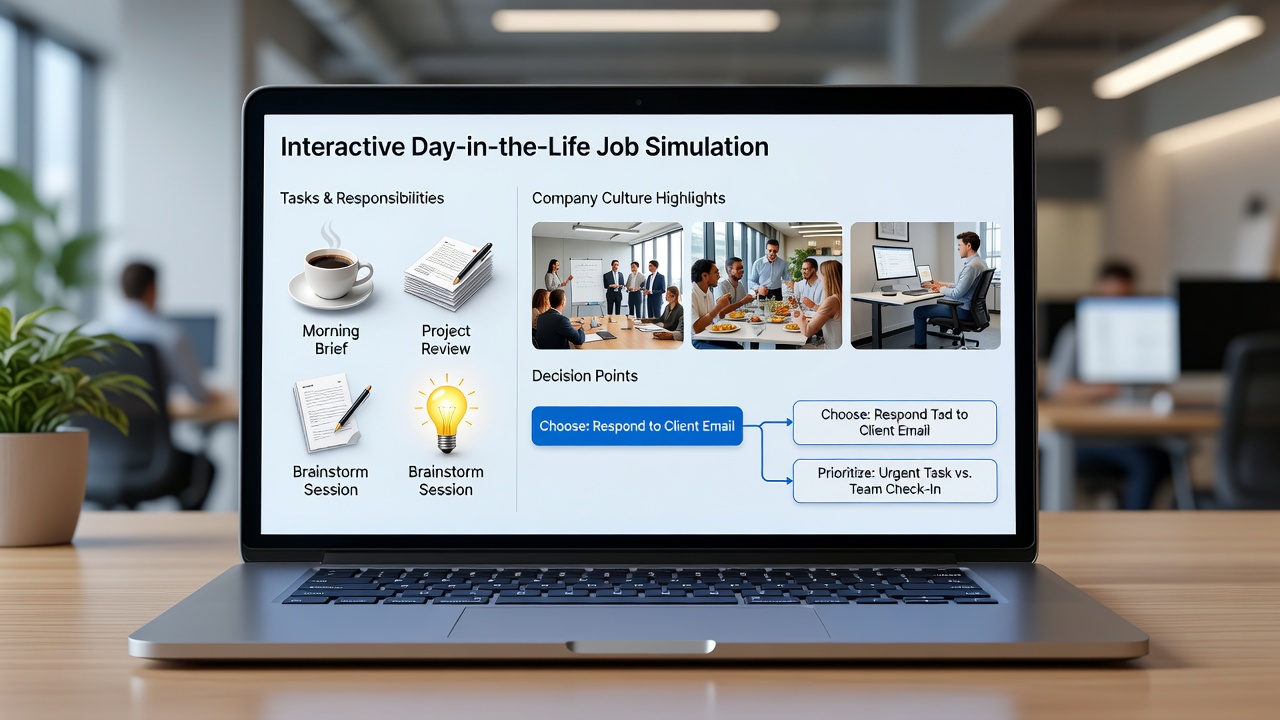
Add quizzes, clickable scenarios, or decision-tree exercises that let candidates explore culture and typical choices they would face. These tools boost engagement, provide immediate feedback, and generate data on candidate fit for recruiters. For example, a simulation might present a customer complaint scenario with multiple response options, revealing how the company values empathy and quick resolution.
Step 5: Highlight Company Culture and Values
Integrate elements that showcase team events, diversity initiatives, work-life balance policies, and growth opportunities. Use real employee testimonials and behind-the-scenes footage to make culture tangible. This step differentiates your organization in competitive talent markets and helps candidates envision their long-term fit.
Step 6: Review, Test, and Iterate
Before launch, pilot the preview with a sample of internal employees and a few external applicants. Gather qualitative feedback on clarity, length, and emotional impact. Use analytics from the platform to track completion rates and drop-off points, then refine accordingly for maximum effectiveness.
Real-World Examples from Mid-Sized Companies
A logistics firm with 450 employees created a 90-second video showing warehouse operations, team meetings, safety protocols, and end-of-shift reflections from current staff. The honest portrayal of physical demands and shift variability helped attract resilient candidates, resulting in turnover dropping significantly within six months of implementation. A healthcare provider used interactive modules allowing applicants to simulate patient interactions, documentation requirements, and shift handovers. This led to higher offer acceptance rates among qualified candidates and improved 90-day retention. Another example comes from a mid-sized marketing agency that combined a low-cost video with an interactive culture quiz; applicants who completed both reported feeling more prepared, and the company saw a measurable decrease in voluntary exits during the first year.
Comparing Low-Cost and Premium Preview Formats
- Low-cost options include smartphone videos, basic quizzes built with free tools, and simple photo slideshows. These are ideal for quick implementation with limited budgets and can be produced internally within a week.
- Premium formats feature professional filming, custom simulations with branching narratives, analytics dashboards, and accessibility features like captions in multiple languages. They require external vendors but deliver deeper insights and higher production quality.
- Both approaches succeed when focused on honesty rather than polish. The key is consistency in messaging across formats to avoid confusing candidates.
- Hybrid models often provide the best value, starting with low-cost elements and upgrading high-traffic roles to premium as results are measured.
Measuring Preview Effectiveness
Track metrics such as application completion rates, time-to-hire, candidate satisfaction scores, and 90-day retention. Survey new hires on how well the preview aligned with actual experiences. The U.S. Department of Labor offers resources on workforce analytics that support these evaluations. Additional indicators include post-preview survey responses, offer acceptance percentages, and qualitative comments from exit interviews. Establish baseline data before rollout to accurately attribute improvements to the new previews.
Common Implementation Hurdles and Solutions
Many teams worry about time investment and internal resistance to showing less flattering aspects of the role. Start small with one role and iterate based on feedback. Another hurdle is maintaining balance between realism and appeal—focus on solutions alongside challenges, such as how the company supports employees through difficult periods. Technical barriers like platform integration can be overcome by using user-friendly tools that require minimal IT support. Finally, ensure legal compliance by avoiding discriminatory language and obtaining necessary releases for employee appearances in videos.
FAQ
How long should a job preview video be?
Keep videos between 60 and 120 seconds to maintain attention while covering essentials. Longer formats work only if divided into chapters with clear navigation.
What metrics best indicate success?
Monitor retention after 90 days, candidate satisfaction scores from post-preview surveys, and changes in offer acceptance rates over time.
Can small teams create effective previews without specialists?
Yes, many organizations begin with internal recordings and simple tools before scaling. Focus on authenticity and gather employee input throughout the process.
How often should previews be updated?
Review and refresh content every six to twelve months or whenever significant role or company changes occur to keep information current.
What if candidates react negatively to realistic challenges shown?
Negative reactions are valuable as they indicate self-selection. Those who proceed are more likely to stay and perform well in the role.
Conclusion
Engaging job previews are a strategic investment in long-term retention. By combining video scripts, simulations, and interactive culture highlights, HR professionals can attract candidates who thrive in the role. Implement these steps methodically, measure results consistently, and refine based on data to see measurable improvements in hiring outcomes throughout 2026 and beyond. Organizations that prioritize transparency in recruitment build stronger, more committed teams that drive sustained success.

No comments yet. Be the first!