 Jobboy

Introduction: Why Your Digital Footprint Matters in 2026
In today’s competitive job market, recruiters increasingly rely on online searches to evaluate candidates before extending interview invitations. A strong digital footprint can significantly boost your visibility during job search and job applications processes. This comprehensive guide walks you through auditing existing profiles, optimizing key platforms like LinkedIn, building personal sites, and maintaining consistent branding to stand out in a crowded field. Professionals who actively manage their online presence often see faster responses to applications and more inbound opportunities from hiring managers.
By following these steps, job seekers can transform passive online presence into an active career advantage. Whether you are an entry-level applicant or a seasoned professional, these strategies apply across industries and experience levels. The goal is to create a cohesive narrative that highlights your skills while minimizing any red flags that could derail your progress.
Step 1: Conduct a Thorough Audit of Your Existing Profiles
Start by searching your name across major platforms including Google, LinkedIn, Twitter/X, Facebook, Instagram, and industry-specific sites like GitHub for technical roles. Note any outdated information, negative content, or inconsistencies that could harm your reputation. Create a spreadsheet to track each profile’s visibility settings, last update date, and content quality. This audit should cover both professional and personal accounts because recruiters often cross-reference multiple sources.
Remove or privatize posts that showcase unprofessional behavior such as complaints about past employers or controversial opinions. Update contact details and ensure all bios align with your current career goals. Pay special attention to older profiles on defunct platforms that might still rank in search results. This foundational audit prevents recruiters from discovering mismatched information during background checks and sets the stage for targeted improvements.
Step 2: Optimize Your LinkedIn Profile for Recruiter Searches
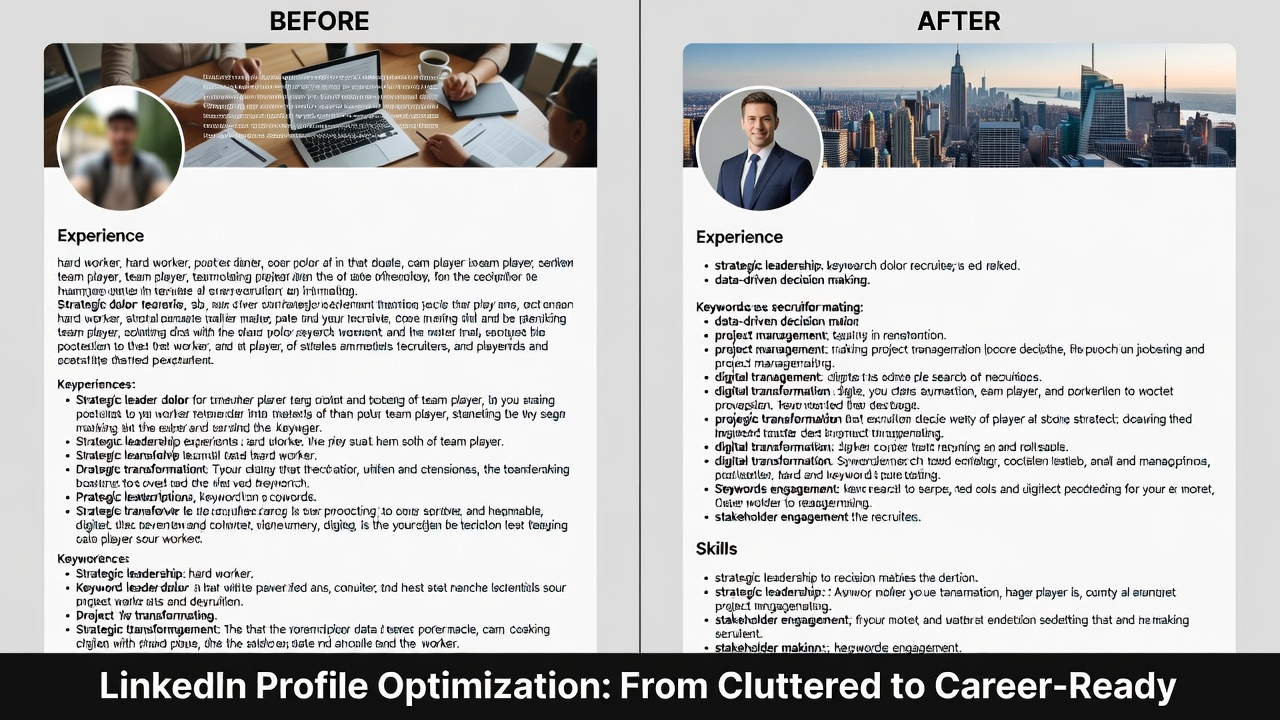
LinkedIn remains the primary platform for professional networking and job search activities. Begin with a professional headshot and a custom banner image that reflects your industry. Craft a headline incorporating target keywords such as “job search specialist” or “digital marketing expert open to job applications.” The summary section should tell a story of your career progression while naturally weaving in phrases related to job search and job applications at least three to four times.
Write a compelling About section using first-person narrative and include specific achievements with metrics where possible. List quantifiable accomplishments in the Experience section rather than generic duties. Request recommendations from colleagues to add social proof and validate your expertise. Join relevant groups and engage with industry content to increase algorithmic visibility. Resources available on LinkedIn emphasize the importance of regular activity to maintain profile ranking in recruiter searches.
Step 3: Build or Refresh a Personal Website
A personal website serves as your owned digital hub and gives you full control over messaging. Use platforms like WordPress or Squarespace to create a clean, mobile-responsive site featuring your resume, portfolio samples, and a blog showcasing thought leadership. Include an optimized homepage with keywords related to your expertise and career objectives. Add a dedicated contact page with a simple form to capture recruiter inquiries directly.
Ensure the site loads quickly and features clear calls-to-action for recruiters to download your CV or schedule a call. Incorporate SEO best practices such as meta descriptions and alt text on images. Link back to this site from all professional profiles for consistent branding. Many successful candidates report that their personal site became the deciding factor when competing against applicants with similar LinkedIn profiles.
Managing Privacy Settings to Balance Visibility and Protection
While visibility helps attract opportunities, strategic privacy controls prevent oversharing sensitive information. On LinkedIn, adjust settings so your profile appears in search results without revealing current employment details if you prefer confidentiality. Review Facebook and Instagram privacy to limit public access to personal posts while keeping professional highlights public. Use two-factor authentication across all accounts to protect against unauthorized access.
Regularly monitor tagged photos and mentions. Use tools like Google Alerts to receive notifications when your name appears online. This balanced approach appeals to recruiters without compromising personal boundaries or exposing family information that could introduce bias into the hiring process.
Expanding to Other Platforms and Niche Networks
Beyond LinkedIn and a personal site, consider optimizing presence on Twitter/X for thought leadership, GitHub for developers, or Behance for creatives. Each platform requires tailored content that still aligns with your overall brand. For example, share industry articles on Twitter with insightful commentary that demonstrates expertise during your job search journey.
Cross-promote content by linking profiles together. This creates a network effect that strengthens search engine rankings for your name combined with keywords like job applications. Avoid spreading yourself too thin across too many platforms; focus on three to five where your target employers are most active.
Real-World Examples: Before-and-After Transformations
Consider Sarah, a marketing professional whose LinkedIn profile previously lacked keywords and featured an outdated photo. After optimization—including keyword-rich summaries and regular content posting—her profile views increased threefold, leading to two recruiter messages within a month. Similarly, John’s generic personal site was transformed into a portfolio highlighting case studies, resulting in freelance job applications converting at a higher rate. Another example involves Priya, who cleaned up old social media posts and added a professional website; within six weeks she received interview requests from three companies that found her through organic search.
Effective vs Ineffective Digital Strategies: Key Comparisons
- Effective: Consistent branding across platforms with professional photos and keyword-optimized bios versus ineffective generic stock images and vague descriptions that fail to rank in searches.
- Effective: Regular engagement through commenting on industry posts and sharing original insights versus ineffective sporadic activity that signals disinterest to algorithm-driven feeds.
- Effective: Privacy settings allowing recruiter discovery while hiding personal life versus ineffective complete public exposure or total invisibility that either invites scrutiny or misses opportunities.
- Effective: Tracking metrics like profile views and connection requests versus ineffective guessing without data to guide further refinements.
Practical Tips for Consistent Branding and Ongoing Maintenance
Maintain the same professional headshot, color scheme, and tone of voice everywhere. Update profiles quarterly to reflect new skills or achievements. Share relevant articles with thoughtful commentary to demonstrate expertise. Set calendar reminders for monthly audits to catch any drift in messaging or new mentions that need addressing. These habits ensure your digital footprint remains an asset rather than a liability throughout an extended job search.
Measuring Your Online Impact and Adjusting Strategy
Track profile views on LinkedIn, website analytics via Google Analytics, and connection growth rates. Monitor application response rates before and after optimizations. Aim for steady increases in recruiter-initiated messages as a key success metric. Tools such as Indeed career resources can help benchmark your progress against industry standards. If views plateau, revisit keyword usage and content frequency to reignite momentum.
Common Mistakes to Avoid During Optimization
Many job seekers make the error of keyword stuffing, which makes profiles read unnaturally and can trigger spam filters. Another frequent mistake is neglecting mobile optimization, since recruiters often browse on smartphones. Failing to secure old usernames on social platforms can also allow others to create confusing accounts under your name. Always verify that contact information is current and easy to find on every profile.
FAQs on Common Pitfalls
How often should I update my profiles? Review and refresh content at least monthly to stay current with new accomplishments and industry trends.
What if old negative content appears in searches? Create positive new content to push it down in rankings and consider professional reputation management if needed.
Is a personal website necessary? While not mandatory, it provides a centralized, controlled space that strengthens your digital footprint beyond third-party platforms.
Should I connect with recruiters directly? Yes, but personalize each request and engage with their content first to build rapport before sending connection invites.
How do I handle gaps in employment on profiles? Frame gaps honestly with brief explanations focused on skill development or personal growth rather than leaving them unexplained.
Conclusion
Optimizing your digital footprint positions you for 2026 job search success by making you discoverable and appealing to recruiters. Implement these audits, enhancements, and branding tactics consistently to convert online visibility into meaningful job applications and career opportunities. Start today to gain a competitive edge in the evolving employment landscape.


No comments yet. Be the first!