 Jobboy

Introduction: Why Data Analytics Is Essential for Freelancers in 2026
Remote freelancers face unique challenges in managing unpredictable income streams, client relationships, and time. Applying basic data analytics transforms guesswork into informed decisions that directly increase earnings. In 2026, with the gig economy continuing to expand and remote work becoming the norm for millions, freelancers who leverage data gain a significant edge over those relying solely on intuition. This guide covers practical metrics, setup steps with accessible tools, real examples from digital nomads, comparisons of tracking methods, and privacy considerations to help you implement these hacks immediately and sustainably.
Many freelancers report feeling overwhelmed by the volume of projects and administrative tasks. Data analytics provides clarity by quantifying what works and what does not. Whether you are a writer, designer, consultant, or developer, these principles apply universally across freelance niches.
Key Metrics Every Remote Freelancer Should Track
Focus on three core areas: project profitability, client acquisition costs, and time allocation. Project profitability reveals which gigs deliver the highest returns after expenses such as software subscriptions, internet fees, or outsourcing. Calculate it by subtracting total costs from revenue for each project and dividing by hours invested to find an effective hourly rate.
Client acquisition costs measure marketing or networking spend per new client. This includes time spent on proposals, LinkedIn outreach, or paid ads divided by the number of clients won. Understanding this prevents overspending on low-return channels.
Time allocation shows how hours break down across billable work, admin, and learning. Many freelancers discover they spend far more time on non-billable activities than expected. Tracking these consistently allows you to drop low-value projects and double down on high performers. Consider adding secondary metrics like average project duration and repeat client rate for deeper insights.
Step-by-Step Setup Using Spreadsheets
Start with Google Sheets, a free and collaborative tool available to anyone with a Google account. Create a master dashboard tab that pulls data from separate sheets for income, expenses, and hours logged. Begin by importing historical data from the past six months to establish a baseline.
- Set up columns for date, client name, project type, revenue received, direct expenses, and hours worked.
- Use formulas like =SUMIF to calculate total revenue per client and =AVERAGE to determine mean project profitability.
- Add pivot tables to summarize time spent on different tasks such as client communication versus actual delivery work.
- Color-code cells using conditional formatting to flag projects below a target margin, such as those yielding less than your desired effective hourly rate.
- Create a separate tab for client acquisition tracking with columns for lead source, cost, and conversion outcome.
This manual foundation requires only 15 minutes per week once established. Export data from invoicing apps like FreshBooks or Wave for accuracy and reduce manual entry errors. Test your spreadsheet with sample data before committing real records.
Free Dashboards to Visualize Your Data
Upgrade from raw spreadsheets with free tools like Google Looker Studio. Connect your Sheets data source and build interactive charts showing trends in profitability over time. Create a simple funnel view of client acquisition stages to spot drop-offs and optimize your outreach process. These visuals make patterns obvious, such as certain months yielding higher earnings due to seasonal client demand or specific project types consistently outperforming others.
Alternative free options include built-in Google Sheets charts or Microsoft Power BI's free tier for more advanced users. Regular visualization helps maintain motivation and reveals opportunities like raising rates for underpriced services. 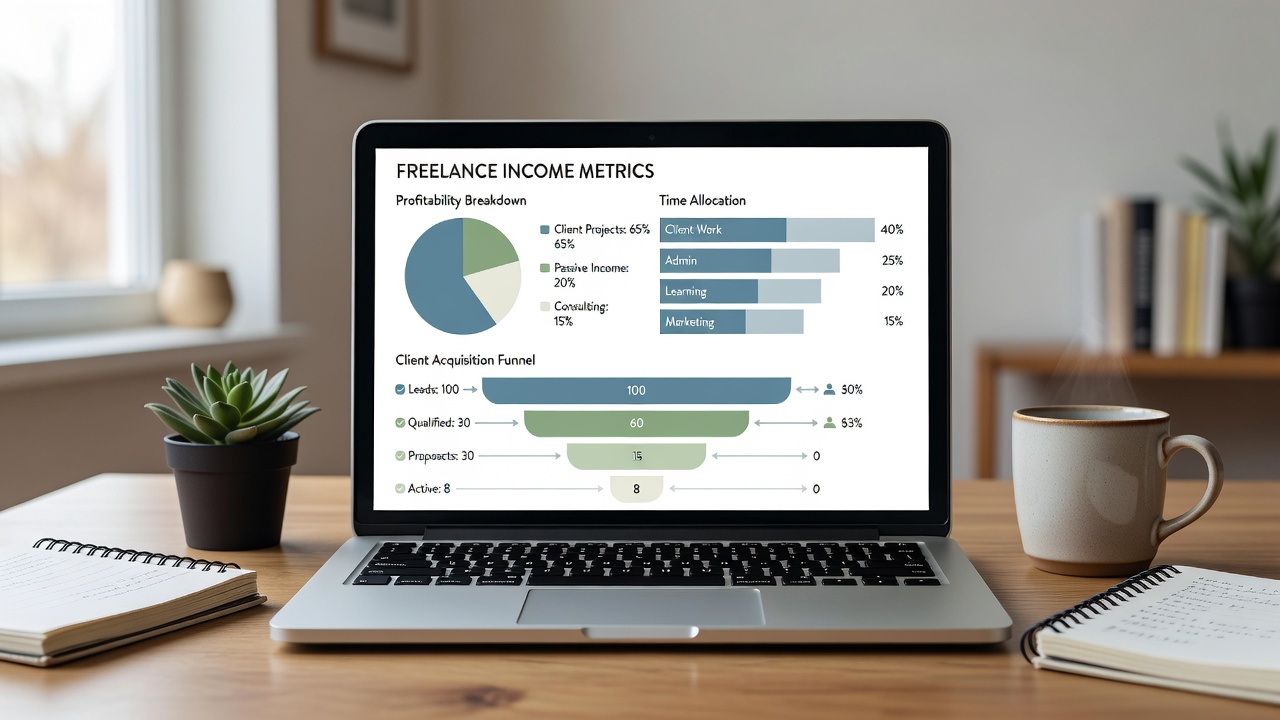
Real-World Examples from Digital Nomads
One location-independent writer used spreadsheet analysis to discover that blog posts for tech clients generated three times the hourly rate of general content. By shifting focus and declining lower-paying assignments, she increased annual revenue substantially within six months while reducing overall working hours. Another graphic designer tracked time allocation and found admin tasks consumed 30% of his week; automating proposals and using templates cut that in half and freed capacity for more billable work, leading to a noticeable income boost.
A third example involves a virtual assistant who analyzed client acquisition costs and realized that referrals from existing clients had near-zero cost compared to paid job board postings. She shifted her strategy toward nurturing relationships, resulting in steadier income and fewer gaps between projects. These stories illustrate how small data-driven adjustments compound over time.
Manual Tracking vs. Automation Options
Manual methods using spreadsheets offer full control and zero cost but demand discipline and consistent effort. They work well for freelancers with fewer than ten active projects per month. Automation through Zapier integrations or built-in dashboard features saves time and reduces errors, though it may involve learning curves and occasional setup maintenance. For most freelancers starting out, begin manually to understand the data before layering automation tools like IFTTT or native app connectors.
Compare the approaches by testing both for one month. Manual tracking builds foundational knowledge, while automation scales efficiently as your freelance business grows. The choice depends on your current volume of projects and comfort with technology. Many combine both by maintaining a core spreadsheet and automating data imports.
Practical Hacks to Implement Today
- Review the past three months of data to identify your top three clients by net profit and consider offering them priority scheduling or bundled services.
- Set weekly alerts for time spent on non-billable tasks exceeding 20% and brainstorm ways to delegate or eliminate those activities.
- Test one new metric, such as average project duration, and adjust rates accordingly to improve margins on longer engagements.
- Compare quarterly performance to spot growth opportunities or red flags like declining profitability in a once-strong niche.
- Share anonymized insights with a freelance peer group for accountability and fresh perspectives on your numbers.
- Document lessons learned in a dedicated notes tab to avoid repeating past mistakes.
Common Pitfalls and How to Avoid Them
Many freelancers fail by tracking too many metrics at once, leading to analysis paralysis. Start with the three core metrics and expand gradually. Another frequent issue is inconsistent data entry, which skews results. Set recurring calendar reminders to log information daily. Finally, ignoring qualitative factors like client satisfaction can lead to short-term gains at the expense of long-term relationships.
Addressing Data Privacy in the Gig Economy
FAQ
How do I protect client data when tracking analytics? Store information in encrypted spreadsheets and avoid sharing raw files. Use anonymized identifiers instead of client names where possible and enable two-factor authentication on all accounts.
Is it safe to connect free dashboard tools to my financial data? Stick to reputable platforms and review privacy settings carefully. Never upload sensitive banking details to unverified services.
What regulations apply to freelancer data handling? Follow general best practices from sources like the Federal Trade Commission on consumer data protection, even for business records. Consult the U.S. Small Business Administration for guidance tailored to independent contractors.
Should I back up my analytics data regularly? Yes, use cloud storage with version history and local backups to prevent loss from technical issues.
Conclusion
Implementing data analytics does not require advanced skills or expensive software. By focusing on profitability, acquisition costs, and time use with simple spreadsheets and dashboards, remote freelancers can make smarter decisions that compound into higher income. Start small, review regularly, and refine based on your unique results. The freelancers who treat their business like a data-driven operation consistently outperform those who rely on intuition alone, positioning themselves for sustainable growth throughout 2026 and beyond.


No comments yet. Be the first!