 Jobboy

Introduction: Taking Control of Your Career in 2026
Mid-level professionals frequently face an overwhelming mix of responsibilities including skill development, strategic networking, and targeted preparation for promotions. The Eisenhower Matrix provides a structured decision-making framework that categorizes tasks according to urgency and importance. This approach helps reduce decision fatigue while directing energy toward activities that drive measurable career advancement. In 2026, with evolving workplace demands such as hybrid collaboration and rapid technological shifts, applying this matrix can lead to faster promotions and clearer professional trajectories. This comprehensive guide covers setup in popular tools, detailed examples aligned with quarterly objectives, comparisons with alternative productivity methods, and strategies for remote environments.
Understanding the Eisenhower Matrix in Depth
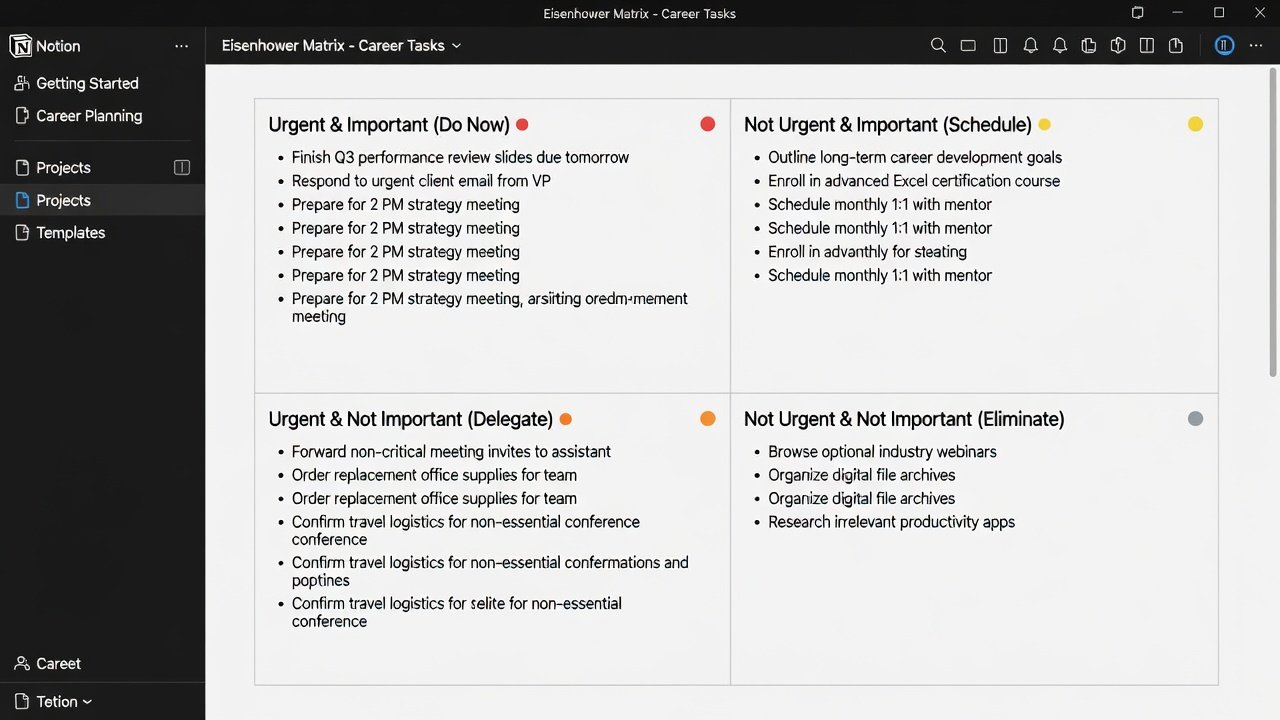
The Eisenhower Matrix organizes tasks into four distinct quadrants. The first quadrant covers tasks that are both urgent and important, requiring immediate action to avoid negative consequences. The second quadrant includes important but non-urgent tasks that support long-term growth and should be scheduled proactively. The third quadrant contains urgent but unimportant items that are often best delegated. The fourth quadrant represents neither urgent nor important activities that should be eliminated to free up time. For career-focused professionals, this framework shifts attention from reactive firefighting to strategic investment in areas like upskilling and relationship building. Research from productivity experts consistently shows that individuals who regularly use quadrant-based prioritization report higher rates of goal achievement and lower stress levels.
Setting Up the Matrix in Notion or Google Sheets
Begin by creating a dedicated workspace for your career matrix. In Notion, start a new database and add properties for Task Description, Urgency Rating, Importance Rating, Assigned Quadrant, Quarterly Goal Link, and Review Date. Use filters to create separate views for each quadrant and add reminders for weekly reviews. Google Sheets offers a lightweight alternative where you can build a table with dropdown menus for urgency and importance levels, then apply formulas to auto-populate the quadrant column. Conditional formatting can highlight Do First tasks in red and Schedule tasks in green. Integrate your matrix with existing workflows by linking it to your calendar or project management tools. Conduct an initial audit of your current tasks to populate the matrix, then commit to 15-minute weekly reviews to adjust priorities based on new developments. This setup typically takes under an hour but yields ongoing benefits in clarity and focus.
Real-World Examples Tied to Quarterly Goals
Imagine a mid-level software engineer targeting a senior role by the end of Q2 2026. In the Do First quadrant, they might place preparing a critical client presentation due the next day. The Schedule quadrant could include completing an advanced cloud certification course, broken into weekly milestones. Delegate tasks such as routine code reviews to junior team members, and eliminate time spent on unrelated industry newsletters. Another example involves a marketing professional aiming to expand their network by 30 contacts before Q4. They would schedule attendance at two virtual conferences in the important quadrant while delegating social media posting to an assistant. These concrete applications demonstrate how the matrix translates abstract career ambitions into actionable, prioritized steps that compound over time.
Comparing the Eisenhower Matrix to Time-Blocking and Habit-Stacking
Time-blocking involves allocating specific calendar blocks to different activities, which provides rigid structure but can struggle when unexpected urgent items arise. Habit-stacking connects new behaviors to established routines, such as reviewing your matrix immediately after your morning coffee. The Eisenhower Matrix excels at the upfront decision phase by forcing explicit evaluation of each task's true value. When combined with time-blocking, the matrix first identifies priorities and time-blocking then protects execution time. Compared to habit-stacking alone, the matrix offers superior strategic oversight. Professionals who integrate all three methods often experience compounded benefits, including reduced decision fatigue and accelerated progress toward promotions. The key is using the matrix as the foundational layer for better decision-making before layering on scheduling or routine-building techniques.
Practical Templates and Customization Options
- Basic quarterly template: Create a master list of 12-15 tasks and assign each to a quadrant with specific deadlines.
- Promotion preparation template: Emphasize quadrants focused on leadership visibility, skill gap analysis, and internal advocacy activities.
- Networking-focused template: Prioritize events, follow-up messages, and informational interviews in the schedule quadrant.
- Remote work adaptation template: Factor in async communication tools and virtual meeting loads when delegating or eliminating items.
Customize further by adding tags for energy levels required or estimated time investment. Export templates periodically to track patterns across quarters and refine your approach based on what quadrants consistently deliver results.
Common Pitfalls to Avoid
One frequent mistake is mislabeling too many tasks as urgent and important, which leads to constant reactivity and eventual burnout. Another is neglecting the important-but-not-urgent quadrant, causing long-term career development to stall. Failing to review and update the matrix weekly allows outdated tasks to linger. Professionals should also avoid over-delegating without clear instructions, which can create follow-up work. Regular audits help maintain balance and ensure the matrix supports measurable outcomes such as completed certifications or expanded professional networks.
Measuring Outcomes and Tracking Progress
To quantify success, track metrics like number of tasks completed from the schedule quadrant, hours saved through delegation, and direct correlations to career milestones. For instance, consistent matrix use over six months may correlate with a promotion or salary increase. Document baseline decision fatigue at the start and reassess monthly using simple self-ratings. This data-driven layer transforms the matrix from a static tool into a dynamic system for continuous improvement.
FAQ: Adapting the Matrix for Remote and Hybrid Work Environments
How should virtual meetings be categorized? Evaluate each recurring call for its direct contribution to your goals and move low-value ones to the delegate or eliminate quadrant. Can the matrix integrate with remote collaboration platforms? Yes, connect your Notion database to tools like Slack for seamless delegation tracking. What adjustments help with time zone challenges? Prioritize asynchronous tasks in the schedule quadrant and batch urgent cross-time-zone communications. How does it support hybrid team dynamics? Use the matrix to identify which in-person activities truly require physical presence versus those that can remain virtual. These adaptations ensure the framework remains effective regardless of work location.
Conclusion
Implementing the Eisenhower Matrix equips mid-level professionals with a repeatable system for career prioritization in 2026. Through careful setup, real-world application, and ongoing refinement, users can achieve greater clarity, reduced stress, and tangible advancements such as promotions and skill mastery. Start building your matrix today and iterate based on the results you observe.

No comments yet. Be the first!